Products, categories and who sees what
What it does
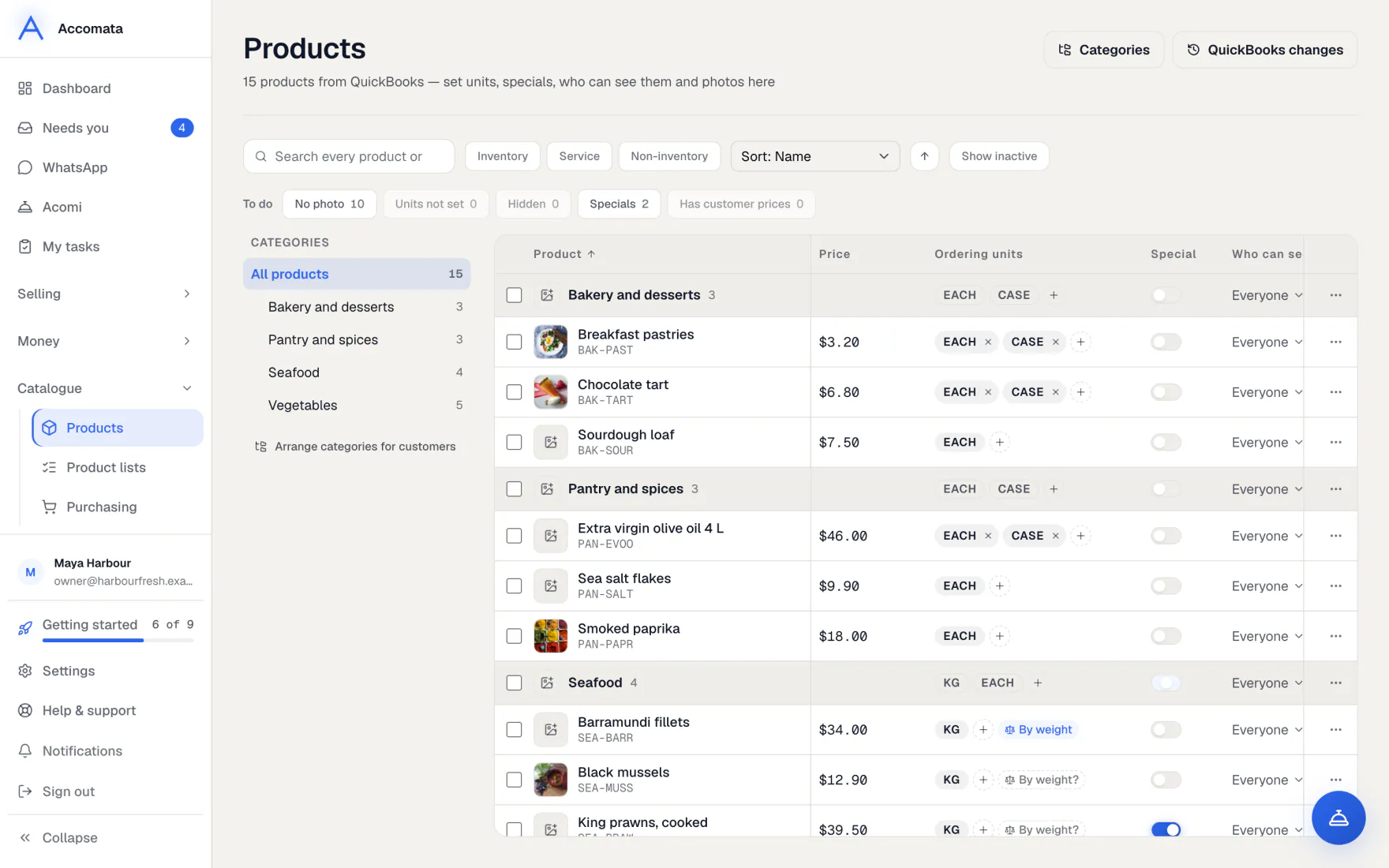
Your products come from QuickBooks with their names and prices. In Accomata you add what customers need to order well: photos, the units they order in, specials, and which customers can see each product.
Categories are the shelves your customers browse. You arrange them here without changing QuickBooks.
How to do it
Get products ready to order
- Open Products. The To do chips show what needs you, such as No photo or Units not set.
- Press Units not set. Add the units each product is sold in, such as case, each or kg. Customers can’t order a product until it has a unit.
- Press No photo and add a photo in the side panel.
- Switch on Special for anything on special this week.
Sold by weight
For a product weighed at packing, open it and use Billed by weight. The packer types the real weight and the invoice follows it.
Choose who can see a product
- Press the Who can see it cell on the product’s row.
- Switch it on or off for your website.
- To keep a product for some customers only, add it to a product list.
Reserve products for some customers
- Open Product lists and make a list.
- Add the products and choose the customers.
- Only those customers can see and order them. They find them on a Reserved for you shelf too.
Arrange your shelves
- Open Categories from the Products page.
- Drag a category onto another to put it inside, or use Move.
- Your website and your customers’ portal show the new order. QuickBooks is never changed.
What if…
What if you can’t find a product?
Search by name or product code. Inactive products are hidden until you choose to show them.
What if a product has options, such as sizes?
Customers see one product with a quantity box for each option.
What if you change a price?
Change it in QuickBooks. Customer prices from price lists and deals stay in Accomata.
Common questions
Does Accomata know what’s on my shelves?
No. Accomata doesn’t keep track of what’s on your shelves. When something runs short at packing, the packer marks it and the customer is told.
Why doesn’t a product show on my website?
It may be switched off for the website, kept on a product list, missing a unit, or inactive in QuickBooks. Look at its Who can see it cell and its side panel.
Can customers order half a kilo?
Yes, for units sold by weight or volume. Counted units, such as a case, are whole numbers.
Still stuck?
A person at Accomata reads every email and replies. Tell us what you were doing and what you saw.