Website info: quotes, logos, brands and more
What it does
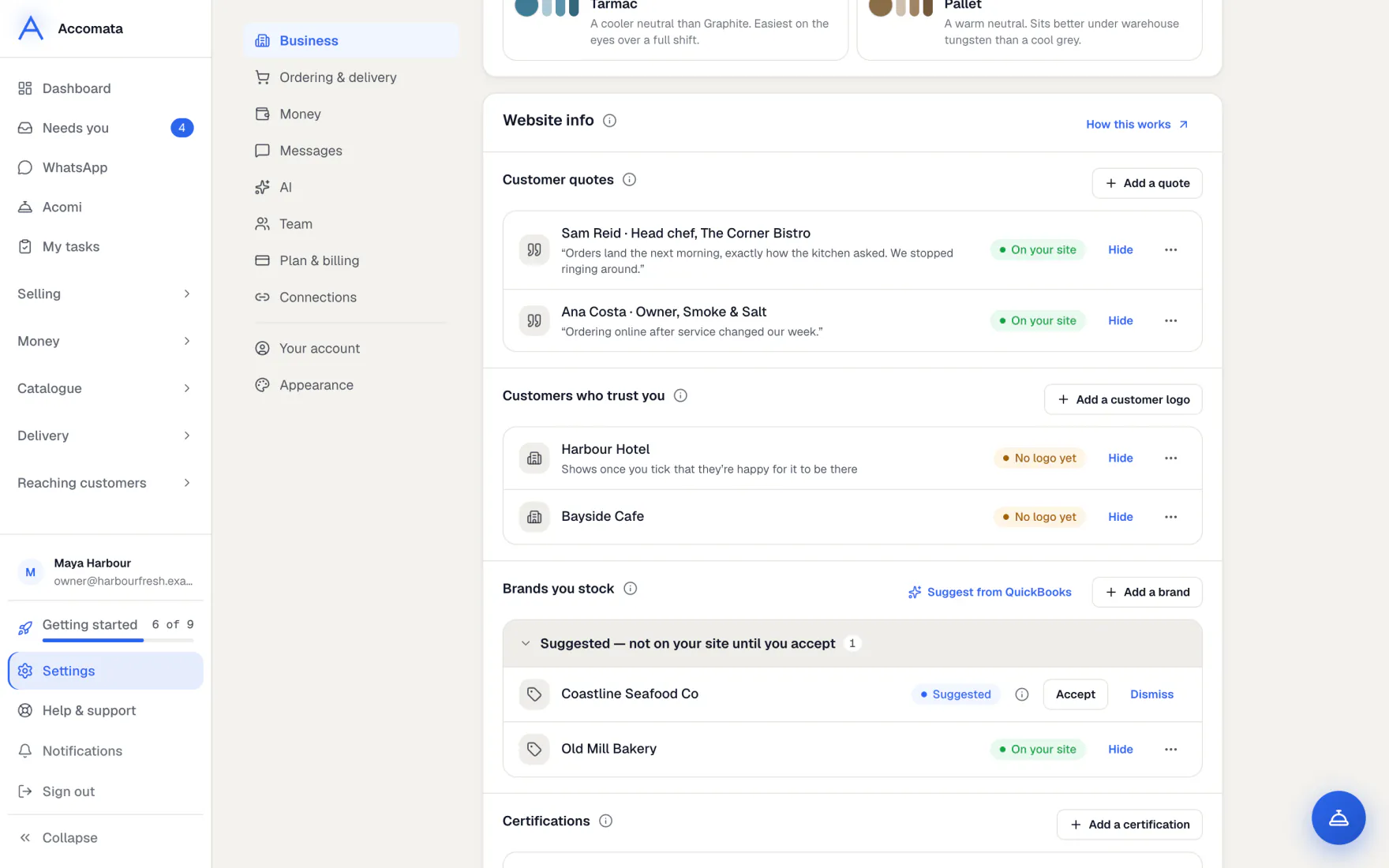
Settings → Business → Website info holds what your website says about you beyond your products: customer quotes, customers who trust you, brands you stock, certifications and where you deliver.
Nothing shows until you add it or accept a suggestion. A customer’s logo only shows once you tick that they said yes.
How to do it
Add something by hand
- Open Settings → Business → Website info.
- In the part you want, press Add a quote, Add a customer logo, Add a brand, Add a certification or Add an area.
- Fill it in, add a picture if it has one, and save.
- Use ⋯ → Move up or Move down to change the order, or hide it for a while.
Accept or dismiss suggestions
- Suggestions sit at the top of their part, marked Suggested — not on your site until you accept.
- Press the “i” to see why it was suggested.
- Press Accept to show it, or Dismiss. A dismissed suggestion is never suggested again.
- For brands and delivery areas, press Suggest from QuickBooks to get ideas from your suppliers and customers.
Ask customers for a quote or their logo
- Open Website and the Brand panel. Find Words from your customers.
- Press Ask for quotes or Ask about logos. Your regulars are listed.
- Check the words, then send. Each email goes 15 seconds after the last, and can’t be unsent.
- When they reply, press Add their reply. Then Show it on my website, or They said yes to showing their logo.
Acomi can help
Acomi can suggest brands you stock and offer to ask customers for a quote or their logo. It always shows you a card first. Nothing goes on your site until you accept.
What if…
What if a customer logo says Needs their OK?
Tick that they are happy for it to be shown. Until then it stays off your site.
What if a brand has no permission for its logo?
Its name still shows. The logo shows once the brand owner says yes.
What if customer emails are off?
Asks can’t be sent. Turn them on in Settings → Messages → Email your customers.
Common questions
Where does it show on my site?
In sections such as quotes, a strip of customer logos, brands you stock, certifications and where you deliver. A section with nothing to show is never drawn.
Is a customer asked twice?
No. Nobody is asked the same thing twice in 90 days.
Who can change Website info?
People who can change business settings.
Still stuck?
A person at Accomata reads every email and replies. Tell us what you were doing and what you saw.