QuickBooks: what comes across and what goes back
What it does
QuickBooks keeps your books. Accomata reads your customers, products, invoices, payments, credit notes and tax codes from it, and keeps them up to date both ways.
Every order becomes an estimate in QuickBooks the moment it is placed. Invoices are made from that estimate. When someone changes the estimate in QuickBooks, QuickBooks wins and the order follows.
How to do it
See what comes across
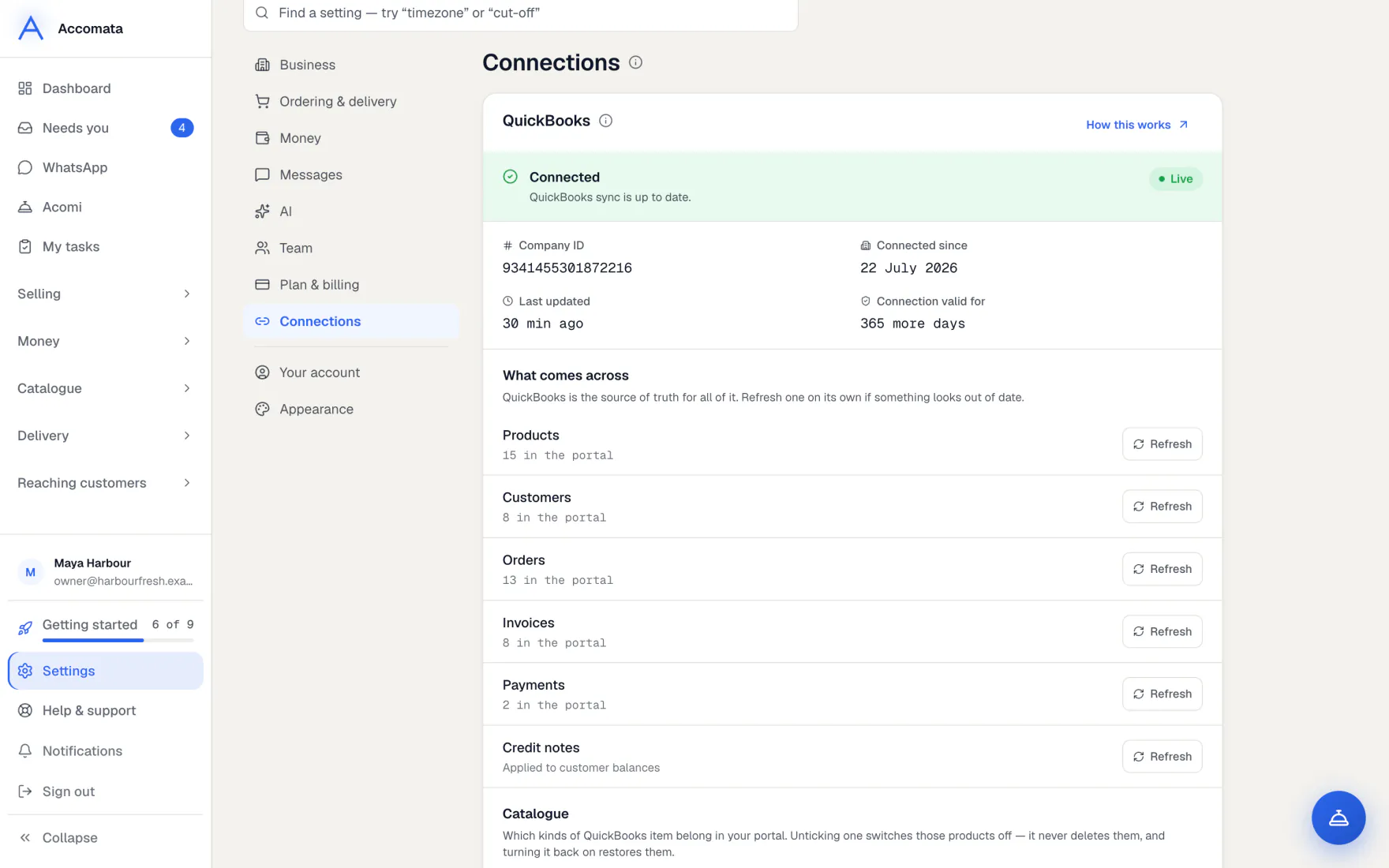
- Open Settings → Connections → QuickBooks.
- Read What comes across: customers, products, invoices, payments, credit notes, tax codes and orders typed into QuickBooks as estimates.
- Press Refresh on a row to bring that kind of record in again now.
What goes back to QuickBooks
An estimate for each order, kept up to date when the order changes. The invoice, made from the estimate. Card and bank payments, recorded against their invoice. New customers you choose to create. Suppliers on products and purchase orders, if you use Purchasing.
Fix orders that didn’t reach QuickBooks
- Open Orders. A red hint says how many orders aren’t in QuickBooks.
- Press it, or pick Not in QuickBooks in the Status menu.
- Press Retry all. You get a notice when it has finished.
Handle an order changed in QuickBooks
- Someone edits a customer’s estimate in QuickBooks.
- The order follows the new version, and it shows in Needs you as changed in QuickBooks.
- Open it, look at what changed and press Got it.
What if…
What if QuickBooks needs reconnecting?
A banner says so on the screens that need it. Press Connect QuickBooks or Reconnect QuickBooks and sign in again. Only people allowed to connect it see the button. Others are told to ask the owner.
What if an update was missed?
A check runs every night and catches estimates that live updates missed. Settings → Connections → QuickBooks shows what last night’s check caught.
What if you want to disconnect?
Disconnect in Settings → Connections → QuickBooks, or from QuickBooks itself. Your QuickBooks data stays in QuickBooks.
Common questions
Where do my customers’ prices come from?
Product prices come from QuickBooks. On top of those you can give customers their own prices with price lists and deals in Accomata. See Price lists, deals and quotes.
Do my customers ever see QuickBooks?
No. Your customers never see where your books are kept. Their screens talk about orders, invoices and payments only.
Can I change a product’s name or price here?
Names, prices and descriptions come from QuickBooks, so change them there. Photos, ordering units, specials and who can see a product are set in Accomata.
Does the app change my QuickBooks company name?
No. Settings → Business → Business name changes the name in Accomata only.
Still stuck?
A person at Accomata reads every email and replies. Tell us what you were doing and what you saw.