Card and bank payments
What it does
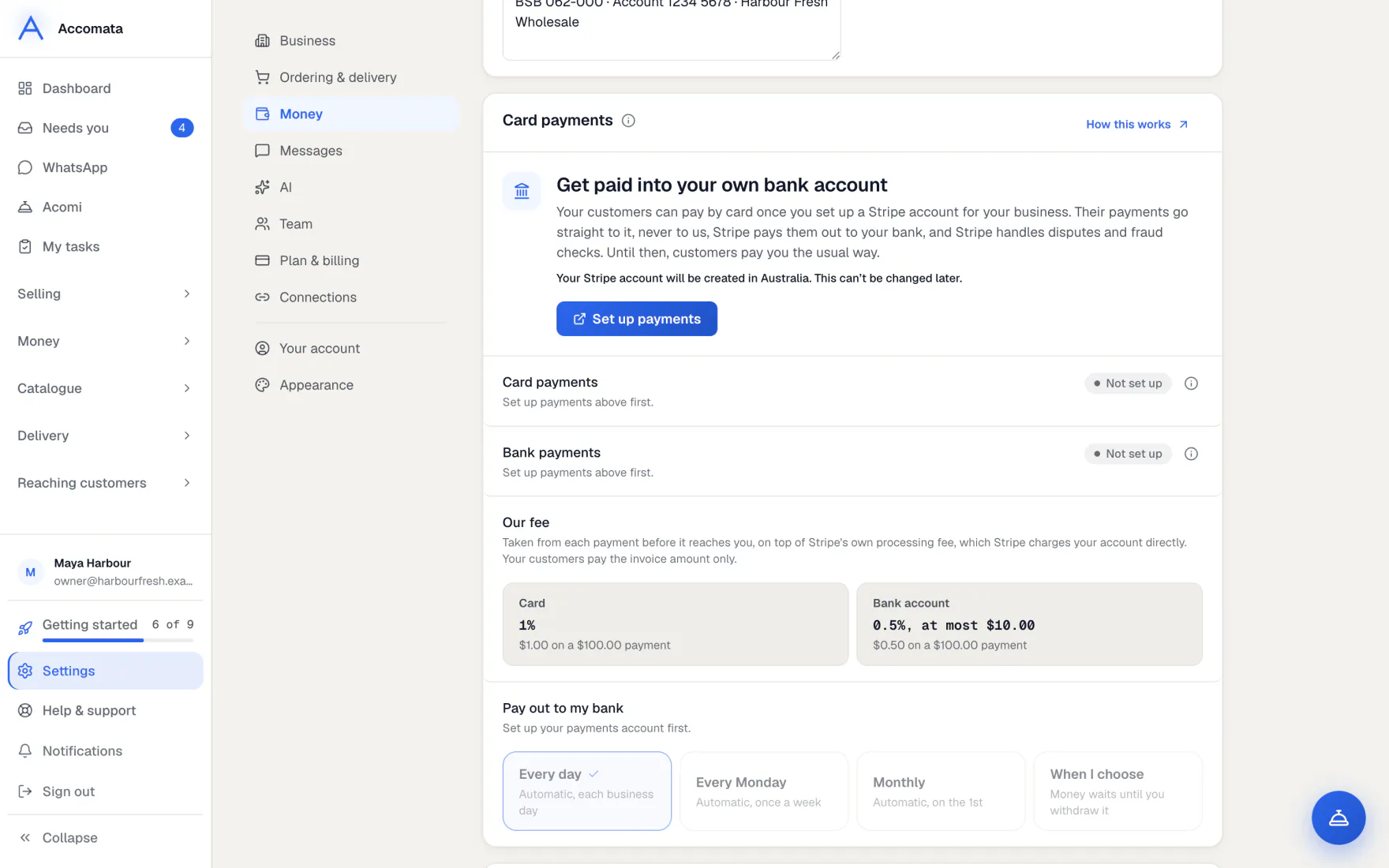
Customers pay you by card, and in Australia and the US by bank. Every payment goes straight into your own Stripe account, never through ours.
Until your Stripe account is set up, customers see no pay buttons at all. Each payment is recorded against its invoice in QuickBooks for you.
How to do it
Set up payments
- Open Settings → Money → Card payments and press Set up payments.
- Fill in Stripe’s form about your business and bank account. The country you pick can’t be changed later.
- Come back to the app. When Stripe has checked your details, card payments show On.
If Stripe needs more
The card says Needs details. Press Update details to go back to Stripe’s form.
Turn on bank payments
- On the same card, find Bank payments (Direct Debit) in Australia or Bank payments (ACH) in the US.
- Press Turn on. It shows Waiting for Stripe, then On.
- Customers can then save their bank account and pay from it. Bank payments are for invoices in your own currency.
Put your brand on Stripe
- Add your logo and colour in Settings → Business.
- They are copied to your Stripe receipts by themselves.
- If Stripe has no business name for you, press Use my business details so your customers’ statements name you.
What if…
What if a bank payment is returned?
It shows as Bank payment returned in Payments → Activity, with the bank’s fee. The customer is never charged that fee.
What if a customer disputes a payment?
You get a notice straight away. Answer it in your Stripe dashboard.
What if your country has no bank payments?
The bank row says Not in your country. Card payments still work.
Common questions
Do you ever hold my customers’ money?
No. Customer payments only ever go to your own Stripe account. If it isn’t connected, nobody can pay online.
What does it cost?
The Card payments card shows the fee on a payment before your customers pay. Your plan is in Plans and billing.
Can payouts be recorded in QuickBooks?
Yes. Press Start recording and choose the accounts. Payouts and fees are then recorded for you.
Do my customers type card numbers into your app?
No. Card and bank details are typed only into Stripe’s own secure form.
Still stuck?
A person at Accomata reads every email and replies. Tell us what you were doing and what you saw.